Showing posts with label Photoshop. Show all posts
Showing posts with label Photoshop. Show all posts
Wednesday, April 14, 2010
The Flower and the Trimotor
Now is the season of semester projects, heaped one on top of the other, tumbling toward exam week. Two Photoshop projects have been completed and added to the website. The first is a merging of two images in a sort of tromp l’oeil fashion, which took forever (if 16 hours is forever) and a bunch of false starts. But along the way I learned on of the Secrets of the Trade, to wit, find a tutorial or two, go through them, then find suitable images and apply the techniques learned. The second project, that of a Ford Trimotor photo aged several decades took only four hours, including the time spent on the tutorials.


Monday, March 29, 2010
Some Photos ‘Shopped
Photoshop has a wide variety of filters out-of-the-box, as well as innumerable available out on the internet. I’ve posted three more of my experiments with them, one of which also contains effects via adjustment layers; they are the Forsythia in Autumn, Basswood in Spring, and Lake Independence at Dawn.
Tuesday, February 16, 2010
Table Layout
The latest lab (#4) assignment for the Dreamweaver class focuses on using a table to control the layout of a web page. The content is a little eccentric, but the underlying table complete with rollover buttons does work. There are five pages (Lab 4 Home, Soprano, Alto, Tenor, and Bass) each of which shares the same layout. The only difference is one button on each page is not active (e.g., the Soprano button in the Soprano page). From a usability standpoint, the buttons should be graphically more obvious (there are seven of them, six on the left side and one for Mr. Shelley on the right). I had to skip ahead to the end of the book for the Photoshop class to learn how to slice an image and save the slices (actually rectangles) as separate images each of which was placed in a cell on the underlying table. For the buttons, there are two images in the cell, one is displayed when the mouse pointer is on the cell, the other when the mouse moves off the cell.
The video of the music is almost illegible; I didn't spend much time on it and it shows.
Later today I may have the site home page re-done with a table layout. Unfortunately, I've outgrown the Lockhart ranch; there just aren't enough buildings.
Many thanks to the volunteer proofreaders out there (not their :-).
The video of the music is almost illegible; I didn't spend much time on it and it shows.
Later today I may have the site home page re-done with a table layout. Unfortunately, I've outgrown the Lockhart ranch; there just aren't enough buildings.
Many thanks to the volunteer proofreaders out there (not their :-).
Wednesday, February 3, 2010
Find the Difference
Learning Photoshop requires a large amount of repetition, not unlike learning to sing or paint. As a way of reinforcing that, the latest little project is to take a photo and make a modified copy that has various additions, changes, and deletions. Take a shoe, for example, and change its color, or rotate a cup about its vertical axis, or make a copy of a car in the background and put it somewhere else on the photo. All of that fundamentally involves developing the ability to use a couple dozen different selection methods (or so it seems; I haven’t actually counted them), learn which pixels to include or exclude at the edge of the selection, put the selection on a new layer and then using one or more of the many color, size, and orientation manipulation methods to alter the selection. The result of the project is to present the before and after images and see if someone else in the class can spot all the changes. So I present to you, dear reader, my modest attempt, which contains nineteen changes. See how many you can find.
The original photo (click on it to see a larger version):

And the modified version:
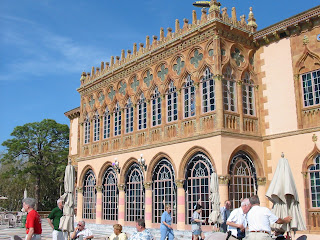
The photo is of the Ca D’Zan in Sarasota, Florida, built by John Ringling of circus fame.
The original photo (click on it to see a larger version):

And the modified version:

The photo is of the Ca D’Zan in Sarasota, Florida, built by John Ringling of circus fame.
Monday, February 1, 2010
Class Starts
The first three weeks of class has been nothing short of a drenching. From the fire hoses of instructors has come a tsunami of knowledge through which only now am I learning to swim. Since the classes are all primarily vocational in nature, as opposed to academic, repetition is key. Figuring out how much repetition is enough to learn, say, the syntax of the
The most visible of my classes for you, the reader, will be Dreamweaver and XHTML. The former is Adobe’s development tool for web sites and the later is the coding language that governs the layout of a web page. I have a web site: RuppOnline.net, where all of my Dreamweaver assignments are posted. The method for turning in assignments is not turning in paper, as those of us who attend school in the last millennium did, but to post to the web site. You see what the instructor sees. I am starting to join the 21st century. I have latitude to add other items to the web site, so long as it is kept separate from the Dreamweaver assignments, so results of Photoshop, Illustrator, and maybe even Java will appear there.
Right now, all you will see is Lab 1, a simple set of web pages with things one typically finds on the Internet, such as text, images, video, and music. I’m working on Lab 2, which adds some more features and should be operational by the end of the day tomorrow.
printf method (a Java programming thingee that formats what the user sees on the screen) or to become familiar with the lasso tool in Photoshop (great for rounding up pixels that need to be included when selecting one apple from many in a photo) is just as important. I could, and have, spent hours selecting and extracting objects from a photo, only to find it was too much; I should have stopped and move on. It’s all just too much fun.The most visible of my classes for you, the reader, will be Dreamweaver and XHTML. The former is Adobe’s development tool for web sites and the later is the coding language that governs the layout of a web page. I have a web site: RuppOnline.net, where all of my Dreamweaver assignments are posted. The method for turning in assignments is not turning in paper, as those of us who attend school in the last millennium did, but to post to the web site. You see what the instructor sees. I am starting to join the 21st century. I have latitude to add other items to the web site, so long as it is kept separate from the Dreamweaver assignments, so results of Photoshop, Illustrator, and maybe even Java will appear there.
Right now, all you will see is Lab 1, a simple set of web pages with things one typically finds on the Internet, such as text, images, video, and music. I’m working on Lab 2, which adds some more features and should be operational by the end of the day tomorrow.
Subscribe to:
Posts (Atom)
